

Appearance
Add Your Finance Team
Give your finance team access to usage, invoices and payments, without access to campaigns or user data
The Finance role is for the people who pay your Linkrunner invoices, such as an accountant or finance manager. They can manage billing for a project, and they cannot see your campaigns, attribution data, users or settings.
What a finance member can do
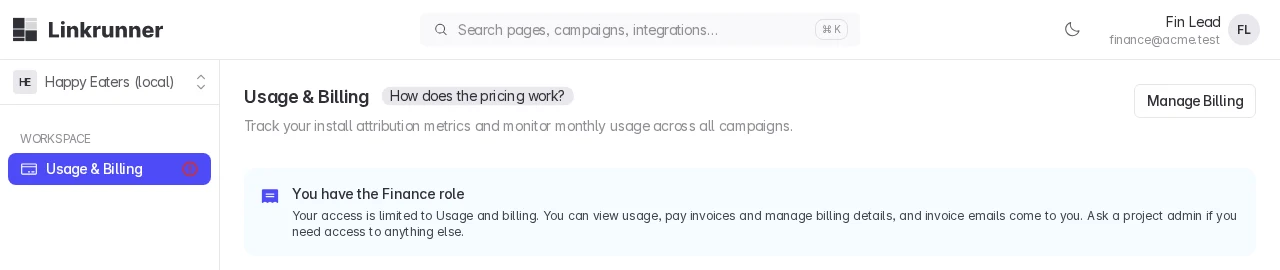
A finance member sees one page in the dashboard: Usage & Billing. On it, they can:
- View install usage for the project
- View and download invoices
- Pay invoices, by bank transfer or payment link
- Add or update the billing details, such as company name, address and GSTIN
- Use the Linkrunner Wallet, if your account has it enabled
They also receive every billing email, along with your admins:
- A new invoice is ready
- Payment reminders and overdue notices
- Payment received, with the receipt
- A wallet recharge is approved
- Account access is restricted or restored
- Requests for GST details
What a finance member cannot see
Every other page is hidden, including campaigns, attribution, users, events, integrations, members and project settings. If a finance member opens a link to one of these pages, the dashboard sends them back to Usage & Billing. The page tells them they have the Finance role and that a project admin can change their access.
Add a finance member
Only project admins can add a finance member or change someone's role to Finance.
Open Members
Go to Settings → Members and click Invite.
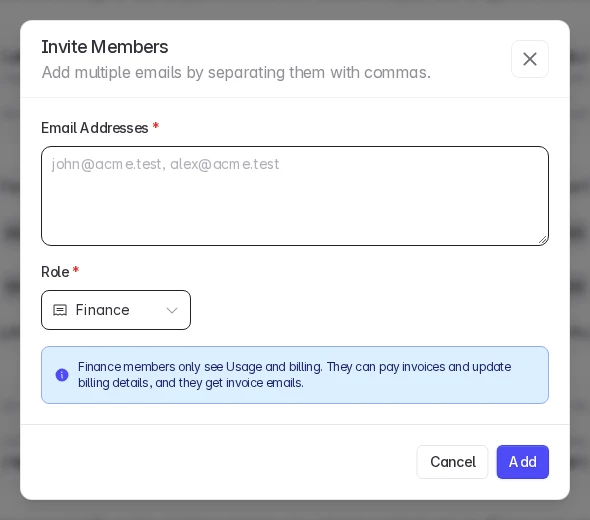
Enter their email and choose Finance
Enter one or more email addresses, set Role to Finance, and click Add.
They sign in
They get an email invitation. When they sign in, they land on Usage & Billing.
To change an existing member to Finance, or back, pick the new role in the Role column on the same page.
Good to know
- Access is per project. Add the finance member to each project they should manage billing for.
- Invoices cover the whole billing account. If several projects share one billing account, a finance member on any of those projects receives the billing emails for the account.
- To remove access, delete the member from Settings → Members.
Need help? Contact support@linkrunner.io